Daksh / glyph
glyph app icon

A notebook with no company behind it

Notion-style block editing, but every note is a plain markdown file — not a row in some startup's database. Write on a laptop, draw on it with an Apple Pencil, and export the lot into Obsidian the day you decide you're done with it.

python stdlib only no dependencies multi-user, open signup PWA — installable light & dark
the features

What glyph does

Everything below is in the app today — this is not a roadmap.

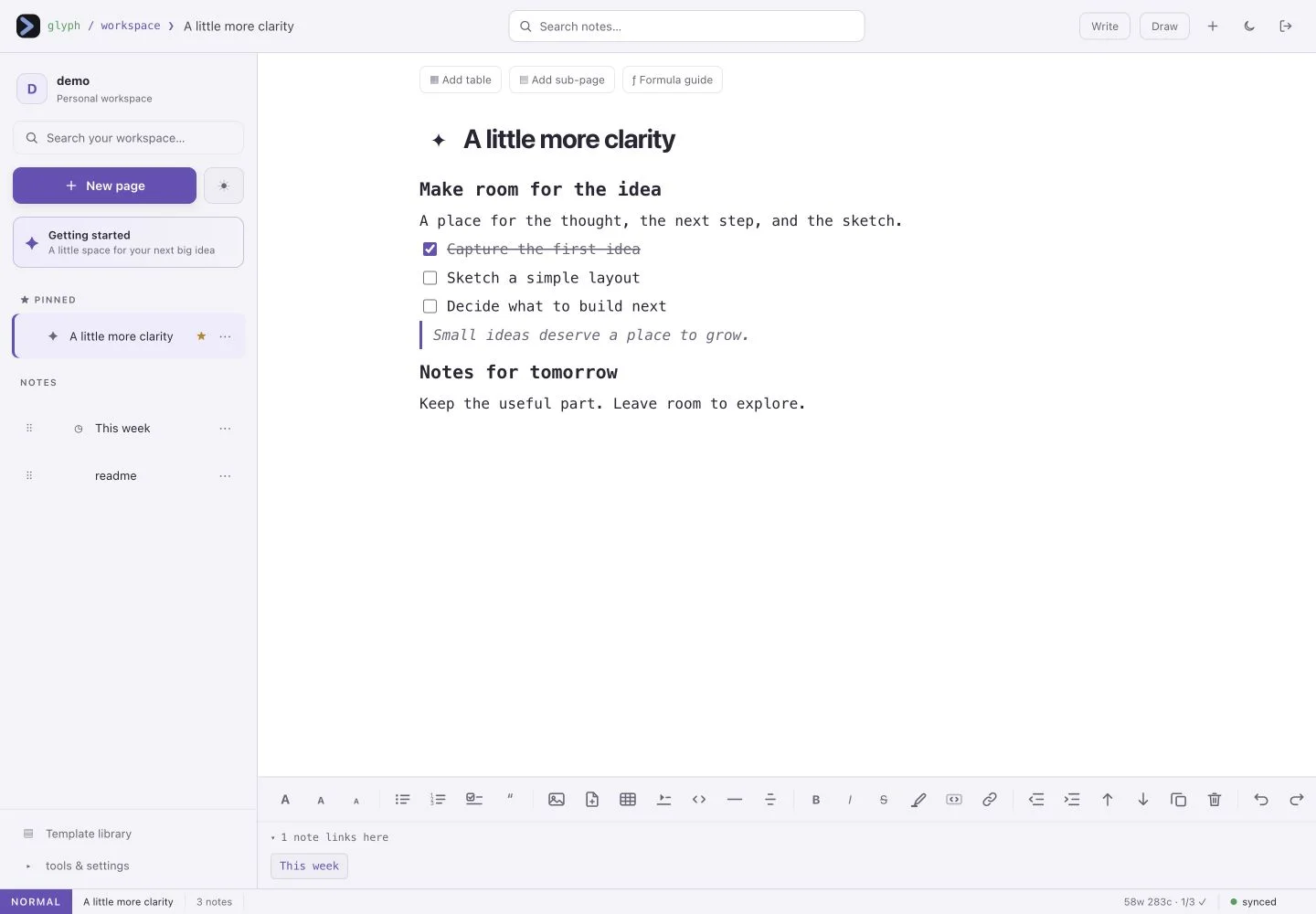
Block editor over real markdown

Headings, bullet and numbered lists, to-do checkboxes, quotes, callouts, code blocks, tables, collapsible toggles and dividers — Notion-style editing, plain markdown underneath.

Slash menu and markdown shortcuts

Type / to insert any block, a callout, a calendar or today's date. Or just type "# ", "- ", "1. " or "> " and the block converts as you go.

Apple Pencil drawing on the same page

Draw straight over your notes; the ink stays visible while you type. Pencil draws, finger scrolls, palm rejection built in — plus lasso select, a highlighter and per-note stroke undo.

Connected notes and a graph view

[[link]] between notes with autocomplete, a backlinks panel including unlinked mentions, and a graph of every note and the links between them.

Full-text search across every note

Ctrl/Cmd+K searches inside your notes, not just their titles, with a snippet showing why each one matched. The same palette runs every action and template.

Fifteen planning templates

Monthly tracker, daily and weekly planners, a calendar generated for the real month, habit and goal trackers, reading list, meal planner, workout log and more. Save any note as your own template.

One-click Google Keep import

Feed it your Google Takeout zip: checklists keep their ticks, labels become #tags, pinned stays pinned, archived gets an #archived tag, and trashed notes are skipped.

Offline-first, syncs when it can

Every keystroke saves to localStorage immediately and syncs to the server when you are back online, with live sync between your devices every couple of seconds.

Images and PDFs inside a note

Paste a screenshot or drop a PDF in and it renders inline using the browser's own viewer. Images are stored as real files in your vault, referenced with plain markdown.

Yours to export or delete

Download a note as .md or the whole vault as a .zip, print to PDF, or delete your account and every note in it yourself without asking anyone.

side by side

glyph vs. the apps it replaces

The honest version — glyph is a one-person project, and there are things the big ones do that it does not.

glyphNotionObsidian
Where your notes liveOne box, no cloud platformNotion's cloudLocal files
File formatPlain markdownProprietary blocksPlain markdown
Block editorYesYesVia plugins
Pencil drawing over notesBuilt inNoVia plugins
Multi-user on one instanceYes, open signupYes, paid seatsNo
Works in a browser, no installYesYesNo, desktop app
Real-time collaborationNoYesNo
Mobile app in the storeNo — PWA you installYesYes
PriceFree, no paid tierFree tier, then paidFree, paid sync
under the hood

How it's built

Python 3 standard library only — no dependencies, no build step, no npm. The entire thing is a handful of files.

server.py     HTTP server, auth, notes API   (stdlib only)
index.html    the whole frontend             (vanilla JS)
users/<you>/vault/*.md                       (your notes)

$ pip install     nothing
$ npm install     nothing

No framework, no bundler, and nothing phoning home — the server makes no outbound calls to anyone but your own browser. Passwords are hashed with PBKDF2-SHA256 at 200k iterations and sessions are random tokens in an HttpOnly cookie. glyph is free to use but it isn't open source, and the code isn't licensed for reuse or resale.

questions

Frequently asked

Is glyph free?

Yes. Create an account at glyph.dakshhq.com — signup is open, there is no paid tier and there is nothing to buy. It runs on a server I already pay for.

Where are my notes actually stored?

As plain markdown files in a private per-account vault folder on my server — a single Hetzner box, not a cloud platform. No other account can read them, and you can export the whole vault as a .zip or delete it outright whenever you like.

Can I open my glyph notes in Obsidian?

Yes. Notes are ordinary markdown files and images are referenced with plain markdown paths, so pointing Obsidian or Syncthing at your vault folder just works.

Does it work on an iPad with an Apple Pencil?

Yes — that is what the drawing mode was built for. Touching the page with the pencil switches to draw mode instantly and that same stroke already draws, while your finger still scrolls.

Is glyph open source?

No. glyph is free to use but it isn't open source, and the code isn't available for reuse or resale. Your notes are a different matter entirely — those are yours, in plain markdown, exportable at any time.

Does glyph track me?

No. There are no analytics, no cookies beyond the session, and no third-party scripts. The server makes no outbound network calls to anyone but your own browser.

Try it

Signup is open and it costs nothing — glyph runs on a server I already pay for.

also here

The other two